technology
How I Sync My Obsidian Vault With OneDrive on Arch Linux
- arch-linux
- onedrive
- obsidian
- rclone
- systemd
I've kept my Obsidian vault in OneDrive for close to 3 years and synced it between Windows and Android. Recently I returned to Linux after a long time and I wanted to keep my vault in OneDrive rather than move my notes to another service.
On Windows I could keep few of the OneDrive's folder available offline and leave the rest of OneDrive on demand. I wanted the same setup on Arch - my notes should open without a connection, while other folders could download files as I needed them.
I couldn't find an equivalent default experience but rclone and systemd gave me the pieces to build it. I've been using the setup for about a month. A week back, a stuck bisync lock caused the offline folder not to sync with the OneDrive. I had a recovery script which reported success while files weren't getting synced yet, which led me to rework the setup a little. Since the fix, the setup has been running smoothly.
The Setup
There are 3 parts:
rclone mountgives me access to the wider OneDrive tree at~/OneDrive.rclone bisynckeeps a local Obsidian directory synchronized with OneDrive (keeping the vaults offline).- A bind mount makes that local directory accessible at
~/OneDrive/Obsidian, so I can keep using the familiar path.
The notes actually live in ~/.local/share/onedrive-offline/Obsidian. I can open that directory directly when I need them offline. The bind is just for the ease of use.
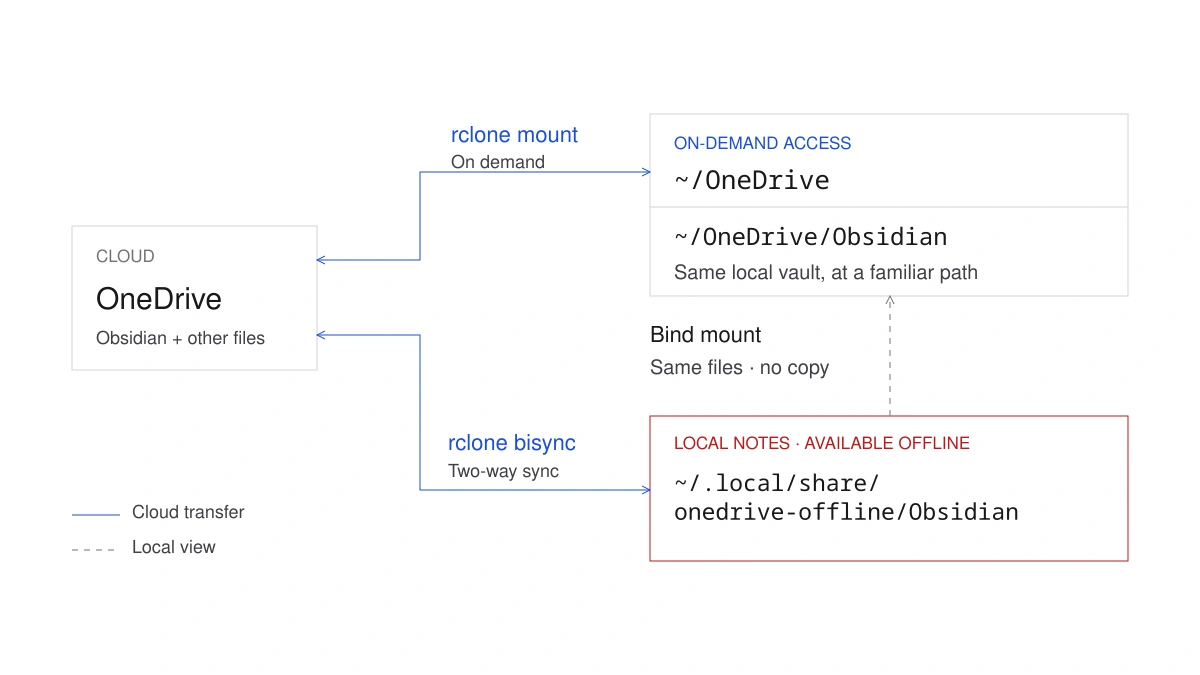
This setup uses rclone 1.75.1 and systemd 262. The snippets below show how the parts fit together. Before enabling recurring sync on an existing vault, back up both sides, configure authentication and initialize the exact bisync pair according to the bisync first-run instructions. Keep rclone.conf private because it contains authentication material.
Giving the Vault Its Own Local Directory
Rclone's mount has a VFS cache. When I open a cloud file, rclone can fetch and cache it. Writes can also wait in that cache before upload.
For my vaults, I wanted the whole folder available even if I hadn't opened a particular file recently. The cache fills on demand and can evict files, so I gave Obsidian a separate working directory:
~/.local/share/onedrive-offline/Obsidian
Bisync connects this directory directly to onedrive:Obsidian. Saving a note changes a local file and a later sync sends the change to OneDrive. Edits from Windows or Android come back through the same sync pair.
This also keeps local editing independent of the cloud mount. I can stop that mount and still work in the backing directory. Uploading and downloading changes waits until OneDrive is reachable again.
The wider OneDrive tree uses this mount command.
rclone mount onedrive: "$HOME/OneDrive" \
    --config "$HOME/.config/rclone/rclone.conf" \
    --cache-dir "$HOME/.cache/rclone" \
    --vfs-cache-mode full \
    --vfs-cache-max-size 20G \
    --vfs-cache-max-age 168h \
    --dir-cache-time 5m \
    --poll-interval 1m \
    --allow-other
Systemd runs this command under my normal account, with absolute paths in the installed service. If that service is already running, leave it in charge of the mount rather than launching another copy.
The 20G setting gives rclone a cache size target. Usage can exceed it while files are open or between cache checks. Changes saved through the mount can still be waiting for upload when you switch devices.
The rclone mount documentation explains the access and cache options.
Running the Sync in the Background
The sync runs as a user service at ~/.config/systemd/user/rclone-onedrive-offline.service:
[Service]
Type=oneshot

ExecStart=/usr/bin/rclone bisync \
    %h/.local/share/onedrive-offline/Obsidian \
    onedrive:Obsidian \
    --conflict-resolve none \
    --max-delete 25 \
    --resilient \
    --recover \
    --max-lock 5m
%h expands to my home directory in this user unit. Each run reconciles the local folder with the remote folder and then exits.
I kept the conflict policy explicit. --conflict-resolve none leaves conflicting versions for review through the default conflict handling, instead of choosing a winner automatically. The pair includes application settings too. Those can still conflict when multiple devices change them, as I described in Clean Obsidian Vault.
There's an important setting here: for bisync, --max-delete 25 means 25% of files, not 25 files. A large directory rename can trip the guard because the old paths appear deleted. When that happens, investigate the change before overriding the guard.
The timer contains:
[Timer]
OnBootSec=2min
OnUnitInactiveSec=5min
Persistent=true
After a run finishes, the timer waits 5 minutes before the next activation, subject to systemd's scheduling tolerance. That gives each run time to complete before another is scheduled. The systemd timer manual covers these settings.
The recovery flags became important when the scheduled job stopped making progress.
My Restart Command Reported Success Too Early
I noticed the problem when a file I had created locally in Obsidian didn't appear in OneDrive through the browser.
I had a restart-onedrive command for recovery and tried that first. It failed with target is busy. Dolphin, my file manager, still had its working directory inside the Obsidian bind mount. I closed it and reran the command.
This time the restart succeeded. The file still didn't appear in OneDrive.
To check both directions, I created a test file locally and another through OneDrive's web interface. Neither reached the other side. The mounts were present and the timers were active, but my files stayed where I had created them.
The bisync service logs showed the same failure on every attempt: an old lock left behind by an interrupted run was blocking the job. Even rebooting hadn't removed it. My command already included --recover and --resilient, but recovery couldn't start while that lock still appeared valid.
My restart command had been checking whether the mounts and timers were running. It could pass all those checks while every sync attempt failed. That explained why its success message hadn't matched what I saw in the browser.
I updated recovery to preserve the local data and sync state, handle the confirmed stale lock safely and wait for a fresh successful bisync before reporting success. After that recovery, synchronization resumed.
I also added an expiry policy for future locks:
     --resilient \
-    --recover
+    --recover \
+    --max-lock 5m
A running job renews this lock every 4 minutes, allowing long syncs to continue. If renewal stops, a later run can proceed once the lock expires. The rclone v1.75.1 implementation shows that renewal behavior. New locks now carry renewal and expiry timestamps; testing recovery by deliberately interrupting a real run is still outstanding.
The earlier lock needed separate handling because adding the flag doesn't rewrite an existing lock's stored expiry. Checking that it was stale mattered: deleting a live job's lock could let another run interfere with it. The bisync manual covers that recovery process.
Keeping the Familiar Folder Path
With the local sync in place, I could point Obsidian straight at the backing directory. I kept ~/OneDrive/Obsidian instead, using a bind mount to expose the local files there.
Both paths reach the same directory. The bind covers the cloud view underneath ~/OneDrive/Obsidian until it is unmounted. The mount manual describes how this second view works.
The important part of the mount definition is:
[Mount]
What=/home/<user>/.local/share/onedrive-offline/Obsidian
Where=/home/<user>/OneDrive/Obsidian
Type=none
Options=bind,_netdev,nofail
TimeoutSec=10s
LazyUnmount=no
ForceUnmount=no
That familiar path adds some work at startup and shutdown. Originally, the cloud mount ran under the user systemd manager while the bind watchdog ran under the system manager. Their dependency graphs are separate, so an After= line across that boundary couldn't coordinate them.
I moved the cloud service into the system manager while keeping the rclone process under my normal account. Bisync and the health monitor remain user services.
The cloud service uses Type=notify to signal when its mount is ready. The bind unit has these dependencies:
[Unit]
Requisite=rclone-onedrive.service
After=rclone-onedrive.service
PartOf=rclone-onedrive.service
They put the bind after the ready cloud service and carry parent stop or restart actions through to the child. Requisite= also makes a bind start fail if the parent is stopped, leaving the decision to start OneDrive with the parent service.
The watchdog verifies the expected cloud mount and compares the device and inode identity of the local source and visible target. That catches a wrong directory mounted at the right path. Its probes have time limits and it refuses unexpected mount layouts.
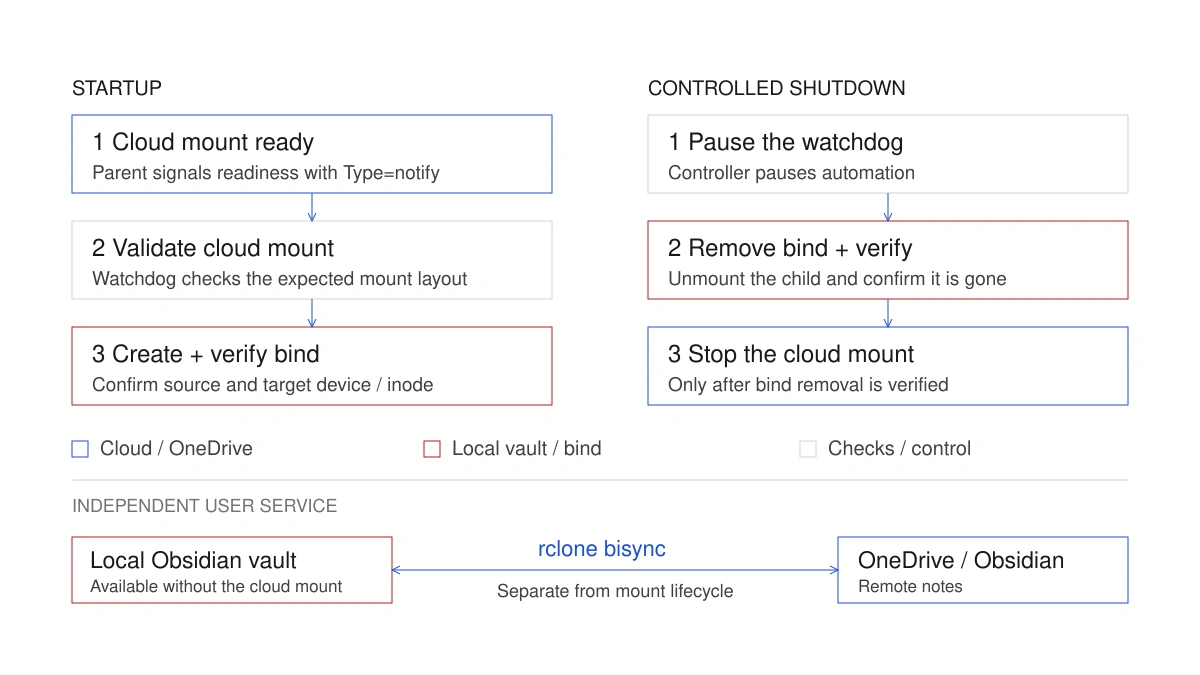
For planned maintenance, the controller pauses the watchdog, removes the child bind and checks that removal before asking the cloud mount to stop. A failed child unmount can still be followed by a parent stop under ordinary systemd processing, so the controller handles that check explicitly.
Checking That Notes Are Actually Moving
After that failure, I wanted to see the result of the last sync and when it finished. This command gives me both:
systemctl --user show rclone-onedrive-offline.service \
    -p ActiveState -p Result -p ExecMainStatus \
    -p ExecMainStartTimestamp -p ExecMainExitTimestamp
After a successful run, the service showed:
ActiveState=inactive
Result=success
ExecMainStatus=0
This oneshot job exits between runs. The start and exit timestamps help us check how recent that success is.
For the mount layout, I use:
findmnt -R "$HOME/OneDrive" -o TARGET,SOURCE,FSTYPE
I also added a health monitor for the cloud service, bind identity, timers and completed sync results. It warns after the same issue appears in 3 consecutive observations. It also tracks whether the last successful completion it observed is more than 30 minutes old, excluding time spent suspended.
The monitor leaves repair to me. It doesn't restart services or clear locks, and notification delivery depends on the desktop session. The bisync service still has no finite startup timeout, so a stuck job needs attention even when the monitor warns about stale progress. These checks track the services and observed results; they don't compare every local file against OneDrive.
Get the Setup Files
I've published the full setup in obsidian-vault-on-onedrive-linux. It includes the systemd units, bind watchdog, health monitor, recovery commands and tests used to put this together.
The README walks through configuring your OneDrive remote, initializing the sync pair, generating files for your account and installing the services. It also covers verification and removal. The setup targets Linux with systemd and has been tested on Arch Linux.
Start with the README and safety notes before using it with your own vault. Make independent backups of your local and cloud files first. Synchronization can propagate deletions and corruption across devices, as Obsidian's backup guidance explains.
What Next
I want to give the setup more time in daily use and test the remaining failure paths, including offline startup and recovery during an outage. The aim is to make routine failures recover safely and persistent failures visible, with restart-onedrive reserved for emergencies.
Once the setup stabilizes, I plan to publish it as an installable script. That will bring the manual setup steps from the README into one installation process. For now, the repository contains the files and instructions for a manual installation.